What is Google Ads?
Google Ads (formerly known as Google AdWords) is an online platform where you can run ads for your business, product, or service.
Simply put—
You can pay to have your ads appear on Google Search, YouTube, Gmail, and other websites.
Google Ads is a bid-based advertising system.
This means that when a user searches for a keyword (such as “Best Shoes Online”),
multiple companies bid to run an ad for that keyword.
The company with the best ad and bidding strategy appears higher.
- You have several ad options in Google Ads:
- Search Ads: Text ads that appear in Google search results.
- Display Ads: Banner or image ads that appear on Google’s partner websites.
- Video Ads: Ads that appear before or during videos on YouTube.
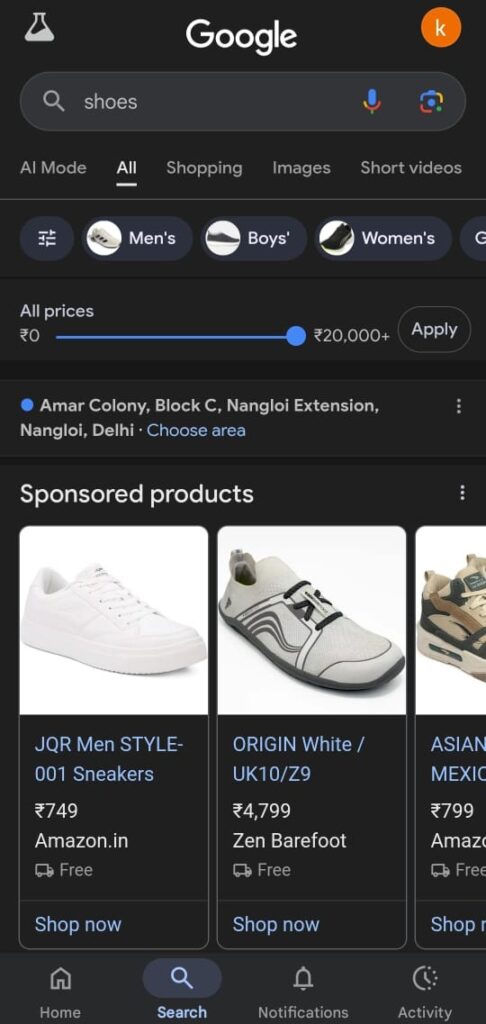
- Shopping Ads: Ads that appear in search results with product photos, prices, and links.
- App Promotion Ads: Ads that encourage mobile app downloads.
The most important thing about Google Ads is that you only pay when someone clicks on your ad—this is called Pay Per Click (PPC).
The Google Ads network is vast.
It displays ads on Google Search, YouTube, and millions of websites.
For this reason, Google Ads is considered the world’s largest digital ad platform today.
According to reports, Google Ads’ digital ad revenue share in the United States is approximately 28.4%—making it the largest digital ad publisher.
If you own a business and want to reach more people,
Google Ads helps you show your ads to the right audience.
This benefits you in terms of leads, sales, and brand awareness.
How Google Ads Work
Running Google Ads sounds simple—you write an ad, place a bid, and sales start rolling in. But the real game is understanding the system behind it.
Google Ads operates on a Pay-Per-Action model, commonly referred to as Cost-Per-Click (CPC). This means you pay whenever a user clicks on your ad or takes a specified action.
Now the question is, how is the price of a click determined?
That price varies and depends on many factors—such as how many companies are bidding on that keyword, search volume, the season or time of year, and public demand.
When you create an ad, you set a Maximum Bid—that is, how much you’re willing to pay for a click, view, or action.
There are three main bidding options in Google Ads:
- CPC (Cost Per Click) – Payment when someone clicks on your ad.
- CPM (Cost Per Mille) – Payment for every 1,000 ad views.
- CPE (Cost Per Engagement) – Payment when a user takes a specific action, such as signing up or watching a video.
For example, if your maximum bid is $2 and Google says that click is worth $2.55, your ad will not appear. However, if your bid is $2.56, your ad’s chances of appearing increase.
This bidding is separate from your overall budget.
You can tell Google to set an average daily budget and bid within that.
Or, you can manually set the bid for each ad yourself.
If you’re new, it’s best to set a daily budget and let Google handle the bidding. This method is simple and often inexpensive and effective.
For example, if you want to spend $1,000, you can run a 30-day campaign with a budget of $33 per day, or a 15-day campaign with a budget of $66 per day. This will give you control over your spending and still get results.
Now let’s talk about another important factor in bidding—Quality Score.
Google assigns a score (from 1 to 10) to each ad and keyword.
This score indicates how closely your ad matches the user’s search.
For example, if your restaurant is running an ad for “avocado sandwich,” the score might be 10.
But if the same ad is showing for “local plumber,” the score will be much lower.
Quality Score indirectly affects your ad’s position and frequency of showing.
A high score will result in more frequent ad appearances and more clicks for less money.
Essentially, Quality Score helps you understand whether your targeting and content are on track. If your ads match the right audience’s searches, you’ll get the best results.
Types of Google Ads
Google Ads has become much more advanced than it once was, but it’s simple.
It now offers a variety of ad formats and features, tailored to different marketing goals.
These are the main types of Google Ads today:
- Responsive search ads
- Performance Max ads
- Discovery ads
- Display ads
- Shopping ads
- App ads
- Smart campaigns
All of these types of Google Ads serve different business goals.
You just need to understand your objective—
whether you want leads, increase sales, promote an app, or build brand awareness.
Choosing the right ad type is the most important starting point for your Google Ads strategy.
Responsive Search Ads
This is the most common and essential ad format in Google Ads.
Every business should include it in their campaign.
These are the text-based ads that appear on Google’s Search Results Page (SERP)—that is, when a user searches for something, the ad that appears at the top marked “Sponsored” is a search ad.
Previously, Google used to have a fixed ad—whatever you typed, it was displayed.
But now Google has started using AI technology in Responsive Search Ads (RSA).
Now you can write multiple different headlines and descriptions in a single ad.
Google automatically creates different combinations of these and displays the most appropriate version based on each user’s search intent.
This means that each user now sees the ad that most closely matches their search.
This increases both click-through rate (CTR) and conversions.
Performance Max Ads
Performance Max Ads aren’t just a single ad type, but rather a comprehensive advertising strategy.
Google built it with its most advanced machine learning and AI bidding system.
Its purpose is to understand your data, audience, and business goals to deliver the best results.
According to Google, running a Performance Max campaign can generate approximately 18% more conversions than traditional search campaigns.
This means that if you were previously generating 100 leads, you’re now likely to generate approximately 118—all without any extra effort, as the AI does the work itself.
What are Discovery Ads?
The ads that appear when someone is watching product reviews on YouTube, checking Gmail, or searching for something related to shopping on Google are called Discovery Ads.
These ads appear where people are searching for new products or information, such as:
- YouTube homepage or “Watch Next” page
- In the Promotions tab of the Gmail inbox
- Google Discover feed (which appears on the Google app or mobile)
This means that when a user is interested in learning about a product or service, Google shows them your ad right then and there.
These ads are somewhat similar to Display Ads and Shopping Ads, but the difference is that Discovery Ads are personalized based on the user’s interests and online activity.
Google uses the following information about users to decide which ads to show to whom:
- Web and App Activity
- App information from the device (phone, tablet, laptop, etc.)
- Contacts
- Location History and Location Settings (such as saved “home” or “work” locations)
This may sound a bit strange, but this approach is very effective for marketing.
Google says Discovery Ads can reach over three billion people.
This means your company or brand can showcase its products to a much larger audience in a smart and targeted way.
YouTube ads
Most people know that YouTube ads appear before, during, or elsewhere on YouTube. These places can include the homepage, subscription feed, “Watch Later” section, and playlist pages.
- Who sees your video ad depends on several factors:
- Whether the user is signed in
- Their likes and interests
- Their watch history
- The goal of your ad campaign
The targeting settings of your ad campaign
You have a few format options for video ads:
- Bumper ads
- Six seconds long
People can’t skip these
- In-stream ads
- Play before, during, or after the video
You can make them non-skippable, or by default, users can skip after five seconds
- Outstream ads
Video ads that run only on Google video ad partner sites, not on YouTube
What are Display Ads?
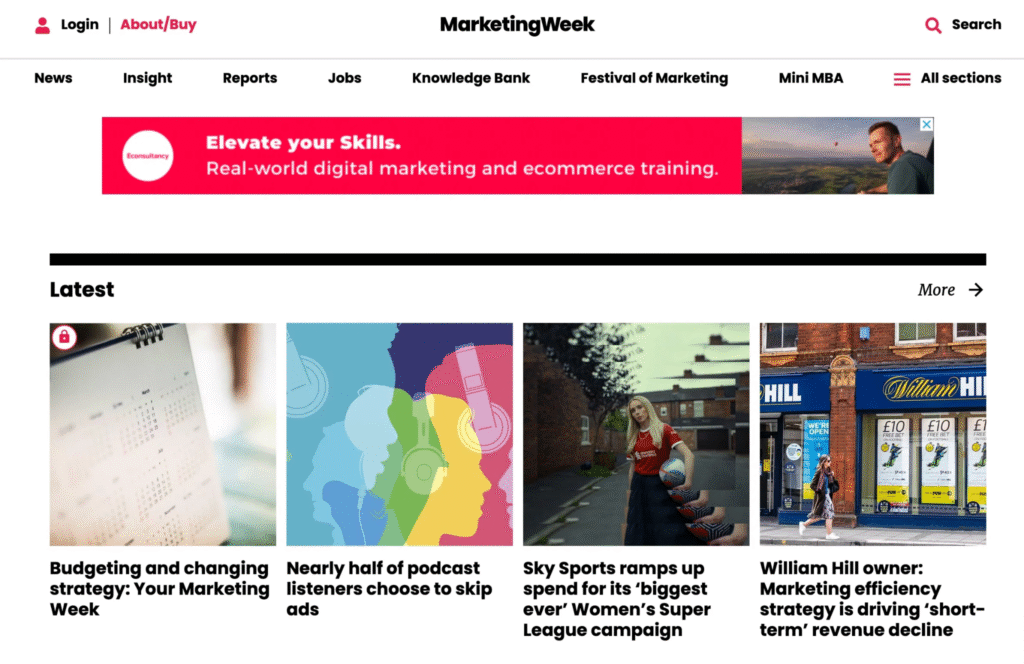
Display ads are images or videos that appear on millions of websites worldwide that are part of the Google Display Network, as well as on Google sites like YouTube.
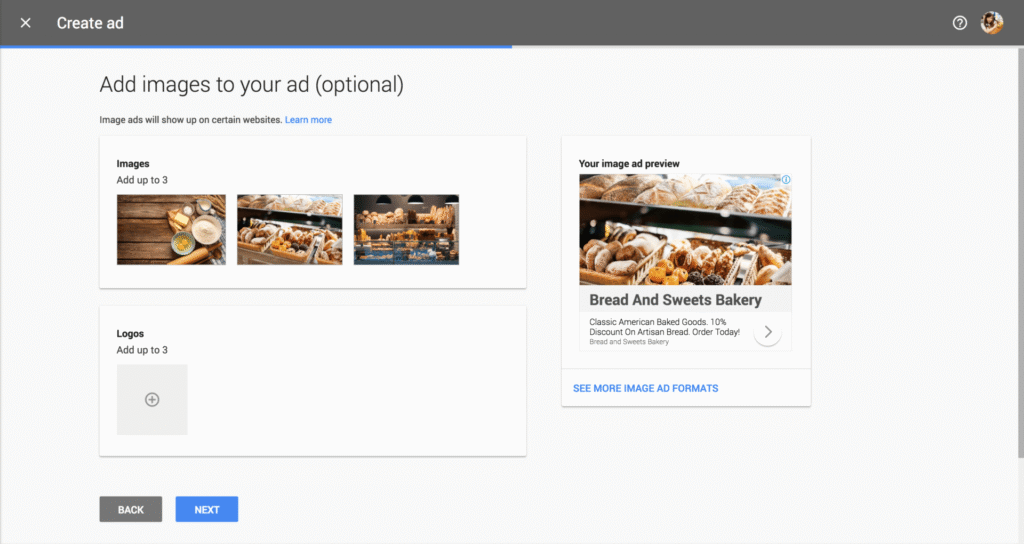
You can create your own display ads, or upload a collection of graphics, videos, logos, and headlines. Google Ads’ AI uses these assets to create the best combination for targeting audiences in Smart Display or Performance Max campaigns.
Starting in 2024, the best practice is to convert your eligible display ad campaigns to Performance Max campaigns. Google Ads describes it this way: “Upload assets and let Google handle the bidding and targeting.”
The reason behind this is that single-image display ads no longer appear in Gmail and other high-value placements, while Performance Max ads do. Additionally, Google says that advertisers who switch display campaigns to Performance Max get an average of 15% more conversions for the same cost-per-action.
What are Shopping Ads?
Shopping Ads use your product catalog to show e-commerce-optimized ads on Google Search, the Display Network, YouTube, and Gmail.
Google’s automatic targeting determines which products are most relevant to a user’s search. For example, if someone is searching for a new, cute marketing-related shirt, Google will show the most relevant product for that user.
Google displays product listings—whether ads or organic results—in an e-commerce-inspired layout. This means it’s easy for users to browse, click, and buy.
What are App Ads?
As the name suggests, App Ads encourage users to download your iOS or Android app.
Android App campaigns have some additional features because Google owns the Google Play Store.
- The goal of your App Ads might be:
- Get more app installs
Drive more engagement with users who already use the app
- Android Campaign Special Feature:
You can run a pre-registration campaign before the app launches to drive initial signups and trial users.
Setup is easy:
- Google uses images, videos, and content from your App Store listing.
- Or you can upload your own media.
Smart Campaigns
Smart campaigns are campaigns in Google Ads that you set up for AI-powered bidding, targeting, and ad placement. In the past, each ad required a Google Ads expert to custom-build and test to achieve optimal results. However, Google’s automated ad system has become much more advanced.
Especially for new users, Smart campaigns are the easiest and most effective way. These campaigns automate optimization for you, eliminating the need for manual setup.
To optimize your Smart campaigns, you can choose one of the following goals:
- Get more leads (calls)
- Get more physical business location visits
- Get more website sales or sign-ups
- Increase brand awareness (video campaigns)
How much do Google ads cost?
TL;DR: Spend as much as you want, brother.
Now let’s get straight to the point—
Google Ads spending (Average CPC) by industry in the US for 2024 is as follows:
- Legal (legal sector) — $6–$9 per click
- Healthcare — $3–$6 per click
- Real Estate — $2–$4 per click
- E-commerce — $1–$2 per click
- Education — $2–$5 per click
- Tech / SaaS — $3–$7 per click
- Automotive — $2–$4 per click
- Food & Restaurants — $1–$3 per click
- Beauty & Personal Care — $1–$2 per click
- Finance / Insurance — $4–$8 per click
This means there’s no fixed budget in Google Ads. Your spending depends on:
- Your industry
- Your goals
- Your bidding strategy